Query data interactively with an AI agent
Overview
The Data Commons Model Context Protocol (MCP) service gives AI agents access to the Data Commons knowledge graph and returns data related to statistical variables, topics, and observations. It allows end users to formulate complex natural-language queries interactively, get data in textual, structured or unstructured formats, and download the data as desired. For example, depending on the agent, a user can answer high-level questions such as “give me the economic indicators of the BRICS countries”, view simple tables, and download a CSV file of the data in tabular format.
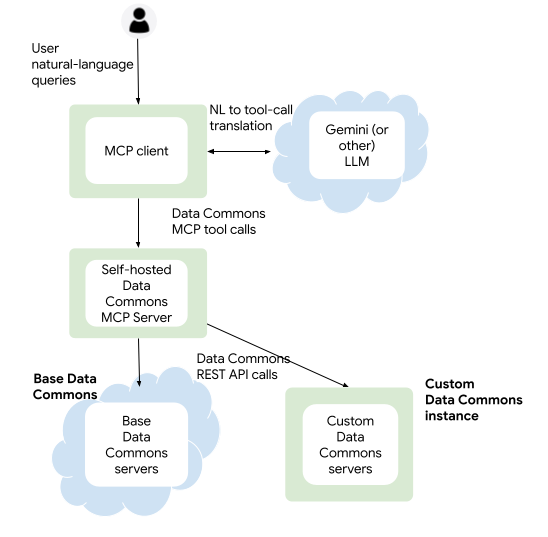
The MCP server returns data from datacommons.org (“base”) by default. It can also be configured to query a Custom Data Commons instance.
For base Data Commons, the server is available as a hosted managed deployment to which you can connect from any AI agent running locally or remotely.
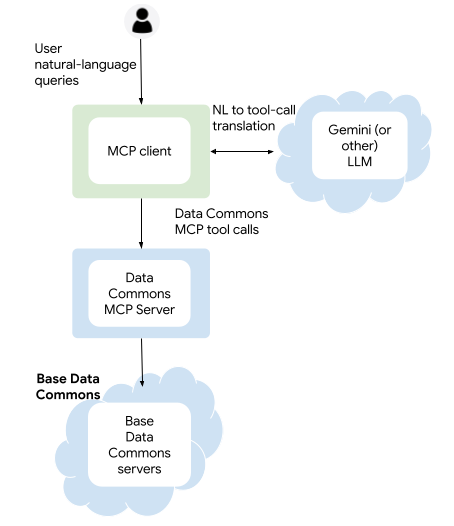
You can also run your own MCP server locally, or in Google Cloud Platform. If you want to use the server to query a Custom Data Commons instance, you must run your own. The server is available as:
- A prebuilt Python package for running locally
- A prebuilt standalone Docker image for running in a cloud service
- Bundled with the Custom Data Commons Docker services image for running in Google Cloud Run (for Custom Data Commons only)
Tools
The server currently supports the following tools:
search_indicators: Searches for available variables and/or topics (a hierarchy of sub-topics and member variables) for a given place or metric. This allows queries such as:- “Tell me what data you have about health in Egypt.”
- “What census data do you have for Canada?”
search_child_indicators: Searches for available variables and topics for contained-in places of a specified type. This allows queries such as:- “What census data do you have for the U.S. states?”
- “Do you have GDP data for Eastern European countries?”
get_variable_metadata: Returns more detailed data about candidate indicators, such as sources, available dates, etc. This allows queries such as:- “What are the sources of data you have about health in Egypt?”
- “How far back does your population data for Canada go?”
get_observations: Fetches statistical time-series data for a given variable and place. This allows queries such as:- “List the population of Canada since 1964.”
- “What are the current populations of China and India?”
get_child_observations: Fetches statistical time-series data for all contained-in places of a specified type. This allows queries such as:- “Compare the life expectancy between different countries in South America.”
- “Rank-order the GDP for all countries in Eastern Europe.”
get_multi_entity_observations: Fetches statistical time-series data for observations involving places that have a directional relationship. This allows queries such as:- “What are the current rice exports from Sri Lanka to Australia?”
- “Which African countries has China provided the most financial aid to?”
Skills
The MCP server has a library of skills packaged as MCP resources. The skills are recipes or “playbooks” that give detailed instructions to agents on how to interact with the server. Each skill is specialized for a different kind of workflow, including:
- Queries for indicators and observations tied directly to a single, specified place, e.g. “France”
- Queries for indicators and observations across contained-in places or sub-regions inside a parent location, e.g. “all countries in South America”
- Queries for indicators and observations involving multiple places with directional relationships between them, e.g. “Canada to/from the United States”
If you’re curious, you can see the library at https://github.com/datacommonsorg/agent-toolkit/tree/main/packages/datacommons-mcp/datacommons_mcp/instructions/agent_api/skills.
Clients
To connect to the Data Commons MCP Server, you can use any available AI application that supports MCP, or your own custom agent. See Use MCP tools for procedures for using Google Antigravity.
For self-hosted deployments, the server supports both standard MCP transport protocols:
- Streamable HTTP: For clients that connect remotely or otherwise require HTTP (e.g. Typescript)
- Stdio: For clients that connect directly using local processes
If you’re interested in this option, see Run a self-hosted MCP server for procedures.
Unsupported features
At the current time, the following are not supported:
- Non-geographical (“custom”) entities
- Events
- Exploring nodes and relationships in the graph
- Returning data formatted for graphic visualizations
Disclaimer
AI applications using the MCP server can make mistakes, so please double-check responses.
Page last updated: October 12, 2026 • Send feedback about this page